Python Cheat Sheet (2026): 250+ Commands with Examples and PDF

What is a Python cheat sheet? A Python cheat sheet is a one-page reference of Python syntax, built-in functions and common methods for strings, lists, tuples, sets, dictionaries and files. This one covers 250+ examples, each with its real output, tested on Python 3.14.
Even experienced developers forget whether sort() returns a value or how negative slicing works. Use this page to look it up in seconds, then get back to coding.
Download the free Python Cheat Sheet PDF (2 pages, printable, updated for 2026)
How to use this page:
- Jump to a section from the table of contents.
- Every row shows the code and what it returns.
- Press Ctrl+F (Cmd+F on Mac) and search for a method name.
- Check your version first: run python –version in a terminal.
Python Basics: Variables, Data Types and Type Conversion
Python is dynamically typed: you create a variable by assigning a value, with no type declaration.
Main Python Data Types
| Type | Example | Mutable? | Notes |
| int | age = 25 | No | Whole numbers, no size limit |
| float | price = 9.99 | No | Decimal numbers |
| complex | z = 2 + 3j | No | Real + imaginary part |
| bool | is_active = True | No | True or False (capitalised) |
| str | name = “Asha” | No | Text in single, double or triple quotes |
| list | nums = [1, 2, 3] | Yes | Ordered, allows duplicates |
| tuple | point = (4, 5) | No | Ordered, fixed |
| set | tags = {“a”, “b”} | Yes | Unordered, unique items |
| dict | user = {“id”: 1} | Yes | Key-value pairs, insertion ordered |
| NoneType | result = None | No | Represents “no value” |
Variables and Basic Syntax
| Task | Code | Output / Result |
| Print a value | print(“Hello”) | Hello |
| Print with separator | print(1, 2, 3, sep=”-“) | 1-2-3 |
| Print without newline | print(“Hi”, end=””) | Hi (no line break) |
| Multiple assignment | a, b = 1, 2 | a = 1, b = 2 |
| Swap two variables | a, b = b, a | values swapped |
| Same value to many | x = y = 0 | both are 0 |
| Single-line comment | # note | ignored by Python |
| Get user input | name = input(“Name: “) | always returns a str |
| Check a type | type(3.5) | <class ‘float’> |
| Type test | isinstance(5, int) | True |
| Delete a variable | del x | x no longer exists |
| Walrus operator (3.8+) | if (n := len(data)) > 10: | assigns and tests in one step |
Type Conversion (Casting)
| Task | Code | Output |
| String to int | int(“42”) | 42 |
| Float to int (truncates) | int(3.9) | 3 |
| String to float | float(“2.5”) | 2.5 |
| Number to string | str(100) | ‘100’ |
| String to list | list(“abc”) | [‘a’, ‘b’, ‘c’] |
| List to tuple | tuple([1, 2]) | (1, 2) |
| List to set (remove duplicates) | set([1, 1, 2]) | {1, 2} |
| Pairs to dict | dict([(“a”, 1), (“b”, 2)]) | {‘a’: 1, ‘b’: 2} |
| Value to boolean | bool(0), bool(“”) | False, False |
| Character to code | ord(“A”) | 65 |
| Code to character | chr(97) | ‘a’ |
| Integer to binary / hex | bin(10), hex(255) | ‘0b1010’, ‘0xff’ |
Special Characters (Escape Sequences)
| Character | Meaning | Example | Output |
| \n | New line | print(“a\nb”) | a and b on two lines |
| \t | Tab | print(“a\tb”) | a b |
| \ | Backslash | print(“C:\temp”) | C:\temp |
| ‘ / “ | Quote inside a string | print(‘It’s’) | It’s |
| r”…” | Raw string (no escapes) | print(r”C:\new”) | C:\new |
| # | Comment | x = 1 # note | comment ignored |
| “””…””” | Multi-line string or docstring | “””Line 1\nLine 2″”” | two lines |
Python Operators Cheat Sheet
Operators work on values. Examples below use a = 10 and b = 3.
Arithmetic Operators
| Operator | Name | Example | Result |
| + | Addition | a + b | 13 |
| – | Subtraction | a – b | 7 |
| * | Multiplication | a * b | 30 |
| / | Division (always float) | a / b | 3.3333333333333335 |
| // | Floor division | a // b | 3 |
| % | Modulo (remainder) | a % b | 1 |
| ** | Exponent (power) | a ** b | 1000 |
| divmod() | Quotient and remainder | divmod(a, b) | (3, 1) |
Comparison Operators
| Operator | Meaning | Example | Result |
| == | Equal to | a == b | False |
| != | Not equal to | a != b | True |
| > | Greater than | a > b | True |
| < | Less than | a < b | False |
| >= | Greater than or equal to | a >= 10 | True |
| <= | Less than or equal to | b <= 2 | False |
| Chained | Range check | 1 < b < 5 | True |
Logical, Membership and Identity Operators
| Operator | Meaning | Example | Result |
| and | Both true | True and False | False |
| or | At least one true | True or False | True |
| not | Reverses a boolean | not True | False |
| in | Value is in a sequence | “py” in “python” | True |
| not in | Value is not in a sequence | 4 not in [1, 2, 3] | True |
| is | Same object in memory | x is None | True if x is None |
| is not | Different objects | x is not None | True if x has a value |
Assignment Operators
| Operator | Same as | Example (start x = 10) | New x |
| += | x = x + 5 | x += 5 | 15 |
| -= | x = x – 5 | x -= 5 | 5 |
| *= | x = x * 2 | x *= 2 | 20 |
| /= | x = x / 4 | x /= 4 | 2.5 |
| //= | x = x // 3 | x //= 3 | 3 |
| %= | x = x % 3 | x %= 3 | 1 |
| **= | x = x ** 2 | x **= 2 | 100 |
Bitwise Operators
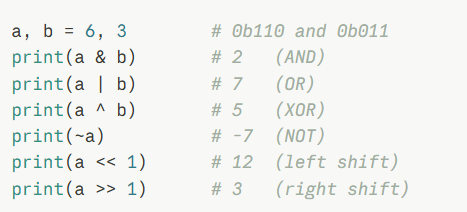
Operator precedence (high to low): **, then unary -, then * / // %, then + -, then comparisons, then not, and, or. Use parentheses when in doubt.
Python String Methods Cheat Sheet
Strings are immutable: every method returns a new string and leaves the original unchanged.
String Indexing and Slicing
Syntax: s[start:stop:step]. The stop index is excluded. Examples use s = “Python”.
| Task | Code | Output |
| First character | s[0] | ‘P’ |
| Last character | s[-1] | ‘n’ |
| First three characters | s[0:3] or s[:3] | ‘Pyt’ |
| From index 2 to end | s[2:] | ‘thon’ |
| All but last two | s[:-2] | ‘Pyth’ |
| Every second character | s[::2] | ‘Pto’ |
| Reverse a string | s[::-1] | ‘nohtyP’ |
| Length | len(s) | 6 |
| Concatenate | “Py” + “thon” | ‘Python’ |
| Repeat | “ab” * 3 | ‘ababab’ |
Common String Methods
| Method | What it does | Example | Output |
| upper() | Converts to uppercase | “hello”.upper() | ‘HELLO’ |
| lower() | Converts to lowercase | “HeLLo”.lower() | ‘hello’ |
| title() | Capitalises each word | “hello world”.title() | ‘Hello World’ |
| capitalize() | Capitalises first letter only | “hello world”.capitalize() | ‘Hello world’ |
| swapcase() | Swaps upper and lower case | “Hello”.swapcase() | ‘hELLO’ |
| strip() | Removes leading and trailing whitespace | ” hi “.strip() | ‘hi’ |
| strip(chars) | Removes given characters from both ends | “xxhixx”.strip(“x”) | ‘hi’ |
| lstrip() / rstrip() | Strips left side / right side only | ” hi”.lstrip() | ‘hi’ |
| split(sep) | Splits into a list at sep | “a,b,c”.split(“,”) | [‘a’, ‘b’, ‘c’] |
| split() | Splits on any whitespace | “a b c”.split() | [‘a’, ‘b’, ‘c’] |
| splitlines() | Splits at line breaks | “x\ny”.splitlines() | [‘x’, ‘y’] |
| join(iterable) | Joins items using the string as separator | “-“.join([“a”, “b”, “c”]) | ‘a-b-c’ |
| replace(old, new) | Replaces every match | “cat hat”.replace(“at”, “op”) | ‘cop hop’ |
| count(x) | Counts occurrences of x | “banana”.count(“a”) | 3 |
| find(x) | Index of first x, or -1 | “banana”.find(“n”) | 2 |
| rfind(x) | Index of last x, or -1 | “banana”.rfind(“a”) | 5 |
| index(x) | Like find() but raises ValueError if missing | “banana”.index(“n”) | 2 |
| startswith(x) | Checks the start | “report.pdf”.startswith(“rep”) | True |
| endswith(x) | Checks the end | “report.pdf”.endswith(“.pdf”) | True |
| isdigit() | All characters are digits | “2026”.isdigit() | True |
| isalpha() | All characters are letters | “abc”.isalpha() | True |
| isalnum() | Letters or digits only | “abc123”.isalnum() | True |
| isspace() | Whitespace only | ” “.isspace() | True |
| zfill(n) | Pads with zeros on the left | “7”.zfill(3) | ‘007’ |
| center(n, ch) | Centers within width n | “hi”.center(6, “*”) | ‘hi‘ |
| partition(sep) | Splits into 3 parts at first sep | “key=value”.partition(“=”) | (‘key’, ‘=’, ‘value’) |
| removeprefix(x) (3.9+) | Removes a prefix if present | “unhappy”.removeprefix(“un”) | ‘happy’ |
| removesuffix(x) (3.9+) | Removes a suffix if present | “file.txt”.removesuffix(“.txt”) | ‘file’ |
f-strings and String Formatting
f-strings (Python 3.6+) are the fastest and most readable way to format text. Examples use name = “Asha” and price = 1234.5.
| Task | Code | Output |
| Insert a variable | f”Hi {name}” | ‘Hi Asha’ |
| Expression inside | f”{2 + 3}” | ‘5’ |
| Two decimal places | f”{price:.2f}” | ‘1234.50’ |
| Thousands separator | f”{price:,.2f}” | ‘1,234.50’ |
| Percentage | f”{0.256:.1%}” | ‘25.6%’ |
| Zero padding | f”{7:03d}” | ‘007’ |
| Right align, width 8 | f”{name:>8}” | ‘ Asha’ |
| Left align, width 8 | f”{name:<8}” | ‘Asha ‘ |
| Debug print (3.8+) | f”{name=}” | “name=’Asha'” |
| Older .format() style | “{} costs {}”.format(“Tea”, 20) | ‘Tea costs 20’ |
New in Python 3.14: template strings use a t prefix, as in t”Hi {name}”. They return a Template object instead of a str, so libraries can safely process the values (for example, to escape HTML or SQL). For everyday printing, keep using f-strings.
Python List Methods Cheat Sheet
A list is an ordered, mutable collection that allows duplicates. Each example below starts fresh from nums = [3, 1, 4, 1, 5].
List Basics and Slicing
| Task | Code | Result |
| Create an empty list | items = [] or items = list() | [] |
| Get item at index 0 | nums[0] | 3 |
| Get last item | nums[-1] | 5 |
| Change an item | nums[0] = 10 | [10, 1, 4, 1, 5] |
| Slice index 1 to 3 | nums[1:3] | [1, 4] |
| Last two items | nums[-2:] | [1, 5] |
| Reversed copy | nums[::-1] | [5, 1, 4, 1, 3] |
| Delete by index | del nums[1] | [3, 4, 1, 5] |
| Length | len(nums) | 5 |
| Smallest / largest | min(nums), max(nums) | 1, 5 |
| Sum of items | sum(nums) | 14 |
| Membership test | 4 in nums | True |
| Join two lists | nums + [9, 2] | [3, 1, 4, 1, 5, 9, 2] |
List Methods
| Method | What it does | Example | Result |
| append(x) | Adds x to the end | nums.append(9) | [3, 1, 4, 1, 5, 9] |
| extend(iterable) | Adds every item from another iterable | nums.extend([2, 6]) | [3, 1, 4, 1, 5, 2, 6] |
| insert(i, x) | Inserts x at index i | nums.insert(0, 7) | [7, 3, 1, 4, 1, 5] |
| remove(x) | Removes the first item equal to x | nums.remove(1) | [3, 4, 1, 5] |
| pop() | Removes and returns the last item | nums.pop() | returns 5 |
| pop(i) | Removes and returns item at index i | nums.pop(0) | returns 3 |
| clear() | Removes all items | nums.clear() | [] |
| index(x) | Returns the index of the first x | nums.index(4) | 2 |
| count(x) | Returns how many times x appears | nums.count(1) | 2 |
| sort() | Sorts in place, returns None | nums.sort() | [1, 1, 3, 4, 5] |
| sort(reverse=True) | Sorts descending in place | nums.sort(reverse=True) | [5, 4, 3, 1, 1] |
| sort(key=func) | Sorts by a custom rule, where words = [“bb”, “a”] | words.sort(key=len) | [‘a’, ‘bb’] |
| reverse() | Reverses in place | nums.reverse() | [5, 1, 4, 1, 3] |
| copy() | Returns a shallow copy | backup = nums.copy() | new list, same items |
| sorted(list) | Built-in: returns a new sorted list | sorted(nums) | [1, 1, 3, 4, 5] |
List Comprehensions
A list comprehension builds a new list in one line: [expression for item in iterable if condition].
| Task | Code | Output |
| Double each number | [x * 2 for x in range(5)] | [0, 2, 4, 6, 8] |
| Filter even numbers | [x for x in range(10) if x % 2 == 0] | [0, 2, 4, 6, 8] |
| If/else inside | [“even” if x % 2 == 0 else “odd” for x in range(3)] | [‘even’, ‘odd’, ‘even’] |
| Flatten a nested list | [n for row in [[1, 2], [3, 4]] for n in row] | [1, 2, 3, 4] |
| Clean user input | [w.strip().lower() for w in [” A”, “b “]] | [‘a’, ‘b’] |
| Dict comprehension | {x: x ** 2 for x in range(3)} | {0: 0, 1: 1, 2: 4} |
| Set comprehension | {len(w) for w in [“hi”, “yo”, “hey”]} | {2, 3} |
| Generator expression | sum(x * x for x in range(4)) | 14 |
Python Tuple and Set Cheat Sheet
Use a tuple when the data should never change and a set when every item must be unique.
Tuples
Examples use t = (1, 2, 2, 3).
| Task | Code | Result |
| Create a tuple | point = (4, 5) | (4, 5) |
| Single-item tuple (comma needed) | single = (5,) | (5,) |
| Access by index | t[0] | 1 |
| Slice | t[1:3] | (2, 2) |
| Count a value | t.count(2) | 2 |
| Find index of a value | t.index(3) | 3 |
| Unpack | x, y = (4, 5) | x = 4, y = 5 |
| Extended unpacking | first, *rest = (1, 2, 3) | first = 1, rest = [2, 3] |
| Named tuple | from collections import namedtuple, then P = namedtuple(“P”, “x y”) | P(1, 2).x returns 1 |
| Try to change an item | t[0] = 9 | TypeError (tuples are immutable) |
Set Methods
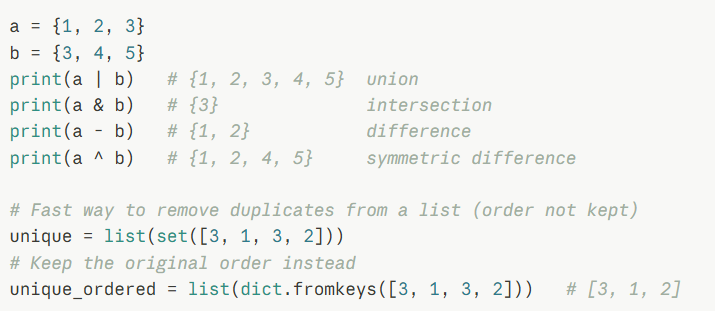
Examples start from a = {1, 2, 3} and b = {3, 4, 5}.
| Method | What it does | Example | Result |
| set() | Creates an empty set ({} makes a dict) | s = set() | set() |
| add(x) | Adds one item | a.add(4) | {1, 2, 3, 4} |
| update(iterable) | Adds many items | a.update([7, 8]) | {1, 2, 3, 7, 8} |
| remove(x) | Removes x, raises KeyError if missing | a.remove(2) | {1, 3} |
| discard(x) | Removes x, no error if missing | a.discard(9) | {1, 2, 3} |
| pop() | Removes and returns an arbitrary item | a.pop() | one item removed |
| clear() | Removes all items | a.clear() | set() |
| union() | Items in either set | a.union(b) | {1, 2, 3, 4, 5} |
| intersection() | Items in both sets | a.intersection(b) | {3} |
| difference() | Items in a but not b | a.difference(b) | {1, 2} |
| symmetric_difference() | Items in exactly one set | a.symmetric_difference(b) | {1, 2, 4, 5} |
| issubset() | All items are inside the other set | {1, 2}.issubset(a) | True |
| issuperset() | Contains all items of the other set | a.issuperset({1, 2}) | True |
| isdisjoint() | No items in common | a.isdisjoint({7, 8}) | True |
| frozenset() | Immutable set (usable as a dict key) | frozenset([1, 2]) | frozenset({1, 2}) |
Set Operators (Shorthand)
Python Dictionary Methods Cheat Sheet
A dictionary stores key-value pairs. Keys must be unique and immutable, and since Python 3.7 dictionaries keep insertion order. Each example starts from user = {“name”: “Asha”, “age”: 28}.
Dictionary Basics
| Task | Code | Result |
| Create an empty dict | data = {} or data = dict() | {} |
| Read a value | user[“name”] | ‘Asha’ |
| Missing key with [] | user[“city”] | KeyError |
| Add or update a key | user[“city”] = “Mumbai” | key added |
| Delete a key | del user[“age”] | {‘name’: ‘Asha’} |
| Check if a key exists | “name” in user | True |
| Number of keys | len(user) | 2 |
Dictionary Methods
| Method | What it does | Example | Result |
| get(k) | Returns the value, or None if missing | user.get(“city”) | None |
| get(k, default) | Returns a default if missing | user.get(“city”, “Pune”) | ‘Pune’ |
| keys() | Returns a view of all keys | user.keys() | dict_keys([‘name’, ‘age’]) |
| values() | Returns a view of all values | user.values() | dict_values([‘Asha’, 28]) |
| items() | Returns a view of key-value pairs | user.items() | dict_items([(‘name’, ‘Asha’), (‘age’, 28)]) |
| pop(k) | Removes key k and returns its value | user.pop(“age”) | returns 28 |
| popitem() | Removes and returns the last pair | user.popitem() | returns (‘age’, 28) |
| update(other) | Adds or overwrites keys | user.update({“age”: 29}) | {‘name’: ‘Asha’, ‘age’: 29} |
| setdefault(k, v) | Returns value, inserting v if key is missing | user.setdefault(“city”, “Delhi”) | returns ‘Delhi’, key added |
| copy() | Returns a shallow copy | backup = user.copy() | new dict |
| clear() | Removes all items | user.clear() | {} |
| dict.fromkeys(keys, v) | New dict with the same value for each key | dict.fromkeys([“a”, “b”], 0) | {‘a’: 0, ‘b’: 0} |
Need a real list? Wrap the view: list(user.keys()) returns [‘name’, ‘age’].
Control Flow: if, for, while and match-case
Python uses indentation (4 spaces is the PEP 8 standard) instead of braces to group code blocks.
if / elif / else
marks = 72
if marks >= 90:
    grade = "A"
elif marks >= 60:
    grade = "B"
else:
    grade = "C"
print(grade)   # B

# One-line conditional (ternary)
status = "pass" if marks >= 40 else "fail"   # 'pass'
for Loops
for fruit in ["apple", "mango"]:
    print(fruit)

for i in range(3):           # 0, 1, 2
    print(i)

for i in range(2, 10, 3):    # 2, 5, 8 (start, stop, step)
    print(i)

for index, fruit in enumerate(["apple", "mango"], start=1):
    print(index, fruit)      # 1 apple, 2 mango

for name, score in zip(["Ravi", "Meera"], [82, 95]):
    print(name, score)       # Ravi 82, Meera 95
while Loops, break, continue and else
count = 0
while count < 3:
    count += 1
print(count)   # 3

for n in range(10):
    if n == 2:
        continue   # skip this iteration
    if n == 5:
        break      # exit the loop
    print(n)       # 0, 1, 3, 4

for n in [1, 3, 5]:
    if n % 2 == 0:
        break
else:
    print("No even number found")   # runs only if the loop did not break
match-case (Python 3.10+)
command = "stop"
match command:
    case "start":
        print("Starting")
    case "stop" | "quit":
        print("Stopping")
    case _:
        print("Unknown command")   # default case
Loop Keywords Quick Reference
| Keyword / function | Purpose | Example |
| range(stop) | Numbers from 0 to stop minus 1 | range(5) gives 0 to 4 |
| range(start, stop, step) | Custom range | range(10, 0, -2) gives 10, 8, 6, 4, 2 |
| enumerate(iterable) | Index and value together | enumerate([“a”, “b”]) |
| zip(a, b) | Loops over lists in parallel | zip(names, scores) |
| reversed(seq) | Loops backwards | reversed([1, 2, 3]) |
| break | Exits the loop immediately | inside for or while |
| continue | Skips to the next iteration | inside for or while |
| pass | Does nothing (placeholder) | if x: pass |
Python Functions: def, lambda, *args and **kwargs
A function is a reusable block of code defined with def. If it has no return statement, it returns None.
def greet(name, greeting="Hello"):
    """Return a greeting message."""   # docstring
    return f"{greeting}, {name}!"

greet("Asha")                    # 'Hello, Asha!'
greet("Ravi", greeting="Hi")     # 'Hi, Ravi!' (keyword argument)

# Return several values (packed as a tuple)
def min_max(nums):
    return min(nums), max(nums)

low, high = min_max([4, 9, 1])   # low = 1, high = 9

# Type hints (optional, not enforced at runtime)
def add(a: int, b: int) -> int:
    return a + b
*args and **kwargs
def total(*args):            # any number of positional arguments, as a tuple
    return sum(args)

total(1, 2, 3)               # 6

def profile(**kwargs):       # any number of keyword arguments, as a dict
    return kwargs

profile(name="Asha", city="Pune")   # {'name': 'Asha', 'city': 'Pune'}

# Unpack a list or dict into arguments
nums = [1, 2, 3]
total(*nums)                 # 6
Lambda, map, filter and sorted
| Task | Code | Output |
| Lambda (anonymous function) | square = lambda x: x ** 2, then square(4) | 16 |
| Apply to every item | list(map(str.upper, [“a”, “b”])) | [‘A’, ‘B’] |
| Keep matching items | list(filter(lambda x: x > 2, [1, 3, 5])) | [3, 5] |
| Sort by a key | sorted([“kiwi”, “fig”, “apple”], key=len) | [‘fig’, ‘kiwi’, ‘apple’] |
| Sort list of dicts | sorted(people, key=lambda p: p[“age”]) | sorted by age |
| Any item true | any([0, 0, 1]) | True |
| All items true | all([1, 1, 0]) | False |
Scope, Decorators and Generators
count = 0
def increment():
    global count     # modify a global variable
    count += 1

# Decorator: wraps a function to add behaviour
import time
def timer(func):
    def wrapper(*args, **kwargs):
        start = time.perf_counter()
        result = func(*args, **kwargs)
        print(f"{func.__name__} took {time.perf_counter() - start:.4f}s")
        return result
    return wrapper

@timer
def slow_sum(n):
    return sum(range(n))

# Generator: yields values one at a time, saving memory
def countdown(n):
    while n > 0:
        yield n
        n -= 1

list(countdown(3))   # [3, 2, 1]
Python Classes and OOP Cheat Sheet
A class is a blueprint for objects. init runs when an object is created, and self refers to that object.
class Account:
    bank = "TT Bank"                 # class attribute (shared)

    def __init__(self, owner, balance=0):
        self.owner = owner            # instance attributes
        self.balance = balance

    def deposit(self, amount):        # instance method
        self.balance += amount
        return self.balance

    def __str__(self):                # used by print()
        return f"{self.owner}: {self.balance}"

acc = Account("Asha", 500)
acc.deposit(250)    # 750
print(acc)          # Asha: 750

# Inheritance
class SavingsAccount(Account):
    def __init__(self, owner, balance=0, rate=0.04):
        super().__init__(owner, balance)   # call the parent constructor
        self.rate = rate

    def add_interest(self):
        self.balance += self.balance * self.rate

s = SavingsAccount("Ravi", 1000)
s.add_interest()
print(s.balance)                      # 1040.0
print(isinstance(s, Account))         # True
Dataclasses (less boilerplate)
from dataclasses import dataclass

@dataclass
class Product:
    name: str
    price: float
    qty: int = 1

p = Product("Pen", 20.0)
print(p)   # Product(name='Pen', price=20.0, qty=1)
OOP Quick Reference
| Concept | Syntax | Purpose |
| Constructor | def init(self, …): | Sets up a new object |
| String form | def str(self): | Text shown by print() |
| Debug form | def repr(self): | Text shown in the REPL |
| Inheritance | class Child(Parent): | Reuses parent behaviour |
| Call parent method | super().method() | Extends rather than replaces |
| Class method | @classmethod with cls | Works on the class, often an alternate constructor |
| Static method | @staticmethod | Utility function inside a class |
| Property | @property | Method accessed like an attribute |
| “Private” attribute | self._balance | Convention: internal use only |
| Check attribute | hasattr(obj, “owner”) | True or False |
Exception Handling: try, except, else, finally
try runs risky code, except handles the error, else runs only if no error happened, and finally always runs.
try:
    value = int(input("Enter a number: "))
    result = 100 / value
except ValueError:
    print("That is not a number")
except ZeroDivisionError as err:
    print(f"Error: {err}")           # Error: division by zero
else:
    print(f"Result: {result}")
finally:
    print("Done")                    # always runs

# Catch several exceptions in one line
try:
    risky()
except (KeyError, IndexError) as err:
    print(type(err).__name__)

# Raise your own error
def set_age(age):
    if age < 0:
        raise ValueError("Age cannot be negative")

# Custom exception class
class InsufficientFunds(Exception):
    pass
New in Python 3.14: you can list several exceptions without parentheses when you don’t use as, for example except KeyError, IndexError:. Keep the parentheses if your code must also run on older versions.
Common Python Exceptions
| Exception | When it happens | Example that triggers it |
| SyntaxError | Code is not valid Python | missing colon after if x |
| IndentationError | Wrong or mixed indentation | tabs and spaces mixed |
| NameError | Variable not defined | print(totl) |
| TypeError | Wrong type for an operation | “5” + 5 |
| ValueError | Right type, wrong value | int(“abc”) |
| IndexError | List index out of range | [1, 2][5] |
| KeyError | Missing dictionary key | {}[“x”] |
| AttributeError | Object has no such attribute | “hi”.push() |
| ZeroDivisionError | Division by zero | 1 / 0 |
| FileNotFoundError | File does not exist | open(“missing.txt”) |
| ModuleNotFoundError | Package not installed | import pandas before pip install pandas |
File Handling in Python: open, read, write and with
Always open files with a with block. It closes the file automatically, even if an error occurs.
# Write (creates the file or overwrites it)
with open("notes.txt", "w", encoding="utf-8") as f:
    f.write("Line 1\n")
    f.write("Line 2\n")

# Append to the end
with open("notes.txt", "a", encoding="utf-8") as f:
    f.write("Line 3\n")

# Read the whole file
with open("notes.txt", encoding="utf-8") as f:
    text = f.read()

# Read line by line (memory friendly)
with open("notes.txt", encoding="utf-8") as f:
    for line in f:
        print(line.strip())
File Modes
| Mode | Meaning | File missing? |
| “r” | Read (default) | FileNotFoundError |
| “w” | Write, erases existing content | Creates it |
| “a” | Append to the end | Creates it |
| “x” | Create, fails if file exists | Creates it |
| “r+” | Read and write | FileNotFoundError |
| “rb” / “wb” | Read / write binary (images, PDFs) | depends on r or w |
File Methods
| Method | What it does |
| f.read() | Reads the entire file as one string |
| f.readline() | Reads the next line |
| f.readlines() | Returns a list of all lines |
| f.write(s) | Writes a string, returns characters written |
| f.writelines(list) | Writes a list of strings (no newlines added) |
Working with Paths, CSV and JSON
from pathlib import Path
import csv, json

p = Path("data") / "report.txt"
p.parent.mkdir(exist_ok=True)       # create folder if needed
p.write_text("Hello", encoding="utf-8")
print(p.exists(), p.suffix, p.stem) # True .txt report

# CSV
with open("marks.csv", newline="", encoding="utf-8") as f:
    for row in csv.DictReader(f):
        print(row["name"], row["score"])

# JSON
with open("config.json", "w", encoding="utf-8") as f:
    json.dump({"debug": True}, f, indent=2)

with open("config.json", encoding="utf-8") as f:
    config = json.load(f)           # {'debug': True}
Most-Used Python Built-in Functions
Built-in functions work without any import. These 25 cover most day-to-day code.
| Function | What it does | Example | Output |
| print(*objs, sep, end) | Prints values | print(“a”, “b”, sep=”/”) | a/b |
| input(prompt) | Reads user input as a string | input(“Age: “) | ’25’ (a str) |
| len(x) | Number of items | len(“hello”) | 5 |
| type(x) | Type of an object | type([]) | <class 'list'> |
| isinstance(x, t) | Type check | isinstance(3, int) | True |
| range(n) | Sequence of integers | list(range(4)) | [0, 1, 2, 3] |
| min(x) / max(x) | Smallest / largest | max([3, 8, 1]) | 8 |
| sum(x) | Adds numbers | sum([1, 2, 3]) | 6 |
| abs(n) | Absolute value | abs(-7) | 7 |
| round(n, d) | Rounds to d decimals | round(3.14159, 2) | 3.14 |
| round(n) | Rounds half to even | round(2.5) | 2 |
| pow(a, b) | Power | pow(2, 3) | 8 |
| divmod(a, b) | Quotient and remainder | divmod(17, 5) | (3, 2) |
| sorted(x) | New sorted list | sorted([3, 1, 2]) | [1, 2, 3] |
| reversed(x) | Reverse iterator | list(reversed([1, 2, 3])) | [3, 2, 1] |
| enumerate(x) | Index-value pairs | list(enumerate(“ab”)) | [(0, ‘a’), (1, ‘b’)] |
| zip(a, b) | Pairs items from iterables | list(zip([1, 2], “ab”)) | [(1, ‘a’), (2, ‘b’)] |
| map(f, x) | Applies f to each item | list(map(int, [“1”, “2”])) | [1, 2] |
| filter(f, x) | Keeps items where f is true | list(filter(None, [0, 1, 2])) | [1, 2] |
| any(x) / all(x) | Any / all items true | all([1, 2, 0]) | False |
| open(path, mode) | Opens a file | open(“a.txt”) | file object |
| dir(x) | Lists attributes and methods | dir(str) | list of names |
| help(x) | Shows documentation | help(len) | help text |
| id(x) | Unique identity of an object | id(x) | an integer |
| hash(x) | Hash value (immutable objects) | hash(“a”) | an integer |
Python Cheat Sheet FAQs
Is there a free Python cheat sheet PDF?
Yes. Download the free 2-page Python Cheat Sheet PDF. It covers data types, operators, string, list and dictionary methods, loops, functions and file handling, and prints cleanly on A4 or US Letter paper.
What should a beginner learn first in Python?
Start with variables and data types, then strings and lists, then if statements and for loops, then functions. Once those feel easy, learn dictionaries, file handling and exceptions. Classes and modules come last.
What is the difference between a list and a tuple in Python?
A list is mutable, so you can add, remove or change items. A tuple is immutable, so it cannot change after creation. Use a list for collections that grow and a tuple for fixed records like coordinates.
How do I reverse a string in Python?
Use slicing with a step of -1: “Python”[::-1] returns ‘nohtyP’. You can also use “”.join(reversed(“Python”)), but slicing is shorter and faster.
What does strip() do in Python?
strip() returns a copy of a string with leading and trailing whitespace removed. Pass characters to remove those instead: “–hi–“.strip(“-“) returns ‘hi’. It does not remove spaces in the middle of the string.
What is the difference between append() and extend()?
append(x) adds x as a single item, even if x is a list. extend(x) adds each item of x separately. So [1].append([2, 3]) gives [1, [2, 3]], while extend gives [1, 2, 3].
How do I check which Python version I have?
Run python –version (or py –version on Windows, python3 –version on macOS and Linux) in a terminal. Inside Python, run import sys and then print(sys.version).
What’s new in Python 3.14?
Python 3.14 adds template strings (t”…”), lazy evaluation of type annotations, official support for free-threaded Python without the GIL, except clauses without parentheses, and a built-in compression.zstd module.
Is Python hard to learn?
Python is one of the easiest languages for beginners because its syntax reads close to English and needs no semicolons or braces. Most learners can write simple scripts within a few weeks of regular practice.
Can I use this cheat sheet for coding interviews?
Yes. The comparison tables, list and dictionary methods, comprehensions and common mistakes sections cover the Python questions asked most often in technical interviews in the US and India.
Key Takeaways
Bookmark this page, or print the PDF and keep it next to your keyboard.
| Topic | Methods you’ll use most | One-line example |
| Strings | split, join, strip, replace, f-strings | f”{price:,.2f}” |
| Lists | append, extend, pop, sort, comprehensions | [x * 2 for x in nums] |
| Dictionaries | get, items, update, pop | user.get(“city”, “Pune”) |
| Control flow | for, enumerate, zip, match | for i, v in enumerate(items): |
| Files | with open(…), pathlib, json | Path(“a.txt”).read_text() |
READ NEXT: