What is Yahoo Mail? What is it used for?

Yahoo Mail is a free, web-based email service provided by Yahoo, designed to help users send, receive, and manage emails efficiently. Launched in 1997, it is one of the oldest and most recognizable email platforms on the internet. Over the years, Yahoo Mail has evolved from a simple inbox into a feature-rich communication tool with modern design, strong spam protection, and generous storage.
At its core, Yahoo Mail allows users to create a personal email address (ending in @yahoo.com) and access their messages from any device with an internet connection. It works seamlessly across web browsers, desktop systems, and mobile apps, making it a flexible choice for both personal and professional communication.
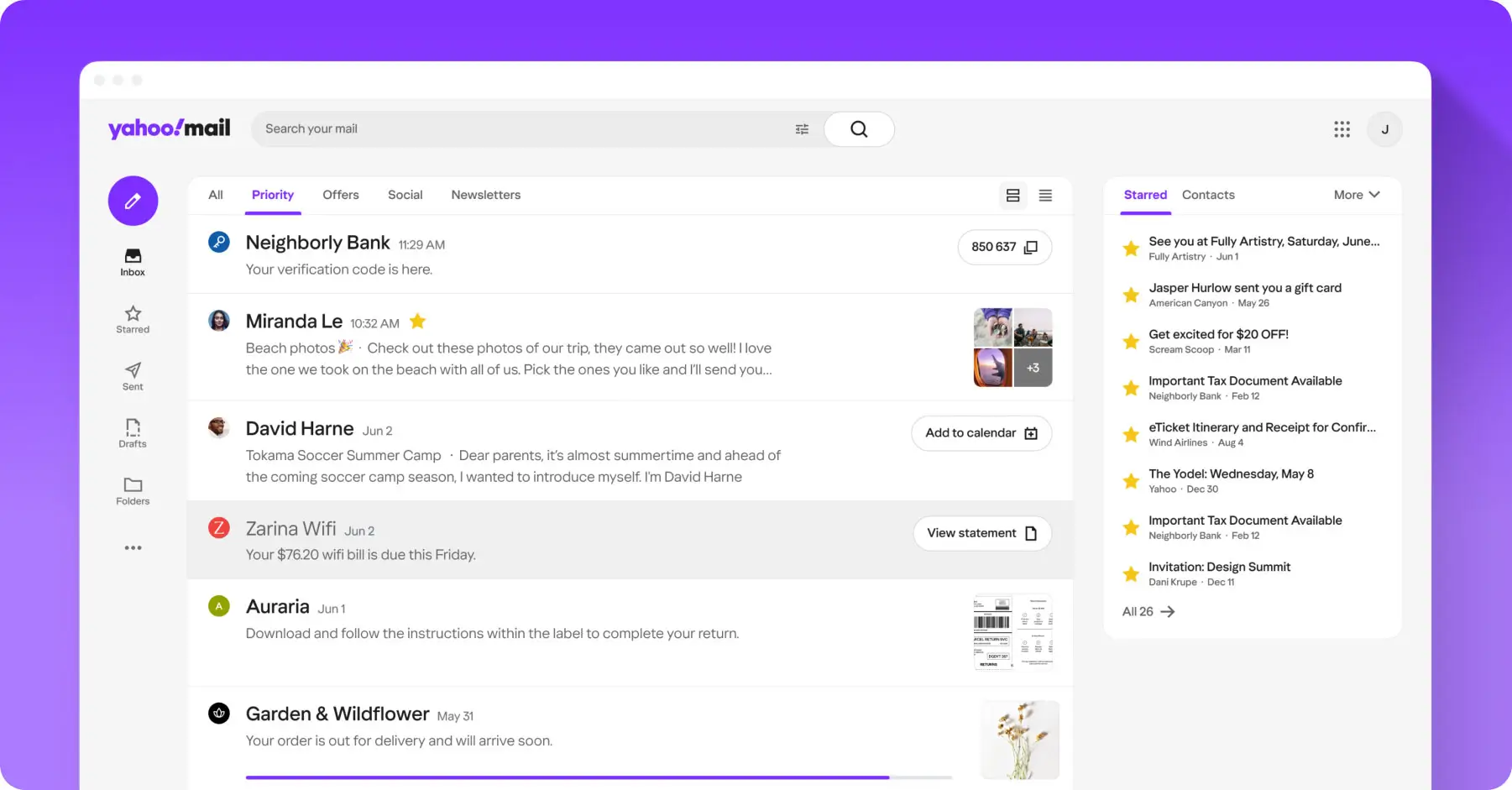
What sets Yahoo Mail apart is its focus on organization, customization, and storage. With a clean interface and smart tools, it helps users keep their inbox clutter-free while staying connected.
Key Features of Yahoo Mail
Yahoo Mail offers a wide range of features that make everyday email use simple and efficient:
1. Massive Email Storage
Yahoo Mail provides 1 TB (terabyte) of free storage, which is significantly more than most email providers. This means users rarely have to delete emails or attachments to free up space.
2. Advanced Spam and Security Protection
The platform uses intelligent filters to detect spam, phishing emails, and malicious attachments. Suspicious messages are automatically sent to the spam folder, keeping your inbox safe and clean.
3. Smart Inbox Organization
Yahoo Mail automatically sorts emails into categories such as Primary, Social, Promotions, and Subscriptions. This helps users quickly find important messages without digging through clutter.
4. Powerful Search Function
With years of emails stored, search becomes crucial. Yahoo Mail’s advanced search lets you filter emails by sender, date, keyword, or attachment type.
5. Customization Options
Users can personalize their inbox with different themes, layouts, and settings. You can also create custom folders and filters to manage emails your way.
6. Built-in Unsubscribe Tool
Yahoo Mail highlights subscription emails and allows you to unsubscribe from mailing lists with a single click no need to search for tiny unsubscribe links.
7. Mobile Apps for iOS and Android
The Yahoo Mail mobile app offers a smooth experience on smartphones, including push notifications, swipe gestures, and quick replies.
8. Multiple Account Management
You can add and manage email accounts from other providers (like Gmail or Outlook) directly inside Yahoo Mail, all in one inbox.
⇒ 30 Yahoo Mail Keyboard Shortcuts
⇒ 20 Best Yahoo Mail Alternatives & Competitors
What Is Yahoo Mail Used For?
Yahoo Mail is used for a wide variety of everyday communication needs, including:
1. Personal Communication
Most users rely on Yahoo Mail to stay in touch with friends and family. It’s ideal for sending personal messages, photos, and documents.
2. Account Sign-Ups and Notifications
Yahoo Mail is commonly used to register for websites, apps, newsletters, and online services. Its strong spam filtering helps keep these emails organized.
3. Business and Freelance Use
Freelancers and small business owners often use Yahoo Mail to communicate with clients, send proposals, and receive important updates especially when large attachments are involved.
4. File Sharing
Thanks to its large storage capacity, Yahoo Mail is convenient for sharing documents, images, and files without worrying about inbox limits.
5. Subscription Management
From shopping alerts to newsletters, Yahoo Mail helps users track and manage subscriptions efficiently using built-in tools.
Final Thoughts
Yahoo Mail remains a reliable and user-friendly email service even after decades in the market. Its massive storage, strong spam protection, smart organization tools, and clean interface make it a solid choice for everyday email use. Whether you need an email for personal communication, online registrations, or light professional work, Yahoo Mail offers a dependable solution that continues to adapt to modern user needs.