What Is a VPN? How It Works, Types of VPN Explained

When you connect to the internet, your device communicates with websites and online services through your internet service provider (ISP). During this process, information such as your IP address, network details, and connection route are involved in every request you make.
This is how the internet normally works.
A VPN, or Virtual Private Network, is a technology that changes this connection path. Instead of your device connecting directly to a website or service, your traffic is routed through a secure server first. This alters how data travels across the internet and how your connection appears to external networks.
VPNs are used in both personal and professional environments. Individuals use them to secure internet connections, especially on shared networks. Organizations use them to allow secure access to private systems from remote locations.
Although VPNs are commonly associated with privacy, their core purpose is network security and controlled access. The technology itself is widely used in computer networks, businesses, and remote work infrastructure.
To understand VPNs properly, it’s important to first define what they are in technical terms before moving into how they work and where they are used.
Formal Definition of VPN
A Virtual Private Network (VPN) is a technology that creates a secure, encrypted connection over a public network, allowing users to send and receive data as if their devices were directly connected to a private network.
This definition is commonly used in computer networking and security contexts because it highlights the two core functions of a VPN:
- Security – Data is encrypted while traveling across the network
- Network extension – A public network behaves like a private one
In simple terms, a VPN does not replace the internet. Instead, it adds a protected layer on top of it, making public networks safer for transmitting sensitive information.
This formal definition forms the foundation for understanding how VPNs work, how they are implemented in computer networks, and why they are widely used in both personal and organizational environments.
What Is a VPN?
A VPN (Virtual Private Network) is a system that sits between your device and the internet and controls how your data is sent and received.
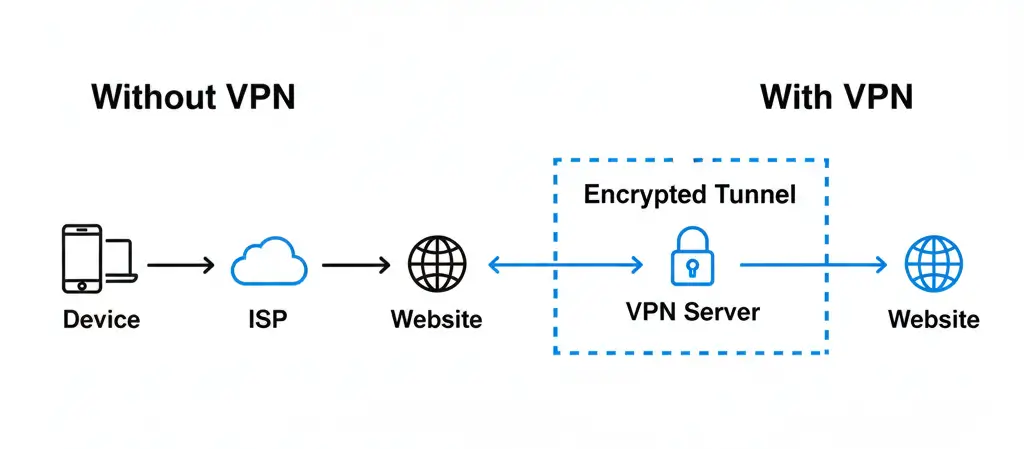
Normally, when you visit a website, your device connects directly to that site through your internet service provider. This direct connection exposes certain network details, including your IP address and routing path.
A VPN changes this by acting as an intermediary. When a VPN is active:
- Your device connects to a VPN server first
- The VPN server forwards your request to the website
- The website responds to the VPN server, not directly to your device
As a result, the website sees the VPN server’s IP address instead of your real one.
A simple example
Imagine sending a package. Without a VPN, you send the package directly from your home address to the destination. Anyone handling the package can see where it came from.
With a VPN, you first send the package to a secure forwarding center. That center then sends the package onward using its own address. The destination receives the package, but your original address is not visible.
In this example:
- Your device is the sender
- The VPN server is the forwarding center
- The website is the destination
What a VPN does at a basic level?
At a fundamental level, a VPN performs three tasks:
- Encrypts data: Information leaving your device is encoded so it cannot be easily read while in transit.
- Routes traffic through a secure server: Instead of going directly to the destination, traffic passes through a VPN server first.
- Replaces your IP address: Websites and services see the VPN server’s IP address rather than your own.
These three actions define how VPNs function in both personal use and computer network environments.
What a VPN does not do?
To avoid confusion, it’s important to understand what a VPN does not provide:
- It does not block all online tracking methods
- It does not make users completely anonymous
- It does not protect against unsafe behavior online
A VPN is a networking and security tool, not a complete solution for all internet risks.
VPN Explained in Computer Networks
In computer networks, a VPN is used to create a secure communication channel over an untrusted or public network, most commonly the internet.
From a networking perspective, a VPN allows devices to communicate as if they were part of the same private network, even when they are physically located in different places.
How VPN fits into computer networks
In traditional computer networks:
- Devices inside a private network can communicate securely
- Access is restricted to authorized users
- Data does not travel openly over public infrastructure
A VPN extends this private-network behavior to remote users.
When a VPN is implemented:
- A secure tunnel is created between the client device and the network
- Data passing through this tunnel is encrypted
- Network access rules are enforced just like on a local network
This makes VPNs a core topic in networking fundamentals, alongside routing, firewalls, and encryption.
VPN as a tunneling mechanism
In computer networking terms, VPNs rely on tunneling. Tunneling means:
- Original data packets are wrapped inside another packet
- The wrapped data travels securely across the public network
- The original data is extracted at the destination
This tunneling process allows private network traffic to move safely over public infrastructure without being exposed.
Why VPNs are used in network design
VPNs are commonly used in network architecture to:
- Allow remote access to internal systems
- Connect multiple private networks securely
- Protect sensitive data in transit
- Reduce the need for dedicated physical connections
Because of these roles, VPNs are widely used in enterprise networks, cloud environments, and remote work setups.
VPNs in academic and practical contexts
In academic contexts, VPNs are often discussed as:
- Secure communication systems
- Applications of encryption and tunneling
- Extensions of private networks
In real-world usage, the same principles are applied to:
- Work-from-home access
- Secure mobile connectivity
- Protecting data on public networks
Understanding VPNs from a computer networks perspective helps bridge theory with real-world implementation.
How a VPN Works (Step-by-Step)
To understand how a VPN works, it helps to compare a normal internet connection with a VPN-enabled connection.
Step 1: Normal internet connection (without a VPN)
When you access a website without a VPN:
- Your device sends a request through your Internet Service Provider (ISP)
- The ISP routes the request to the destination server
- The server sends data back through the same route
During this process:
- Your real IP address is visible
- Network routing information is exposed
- On shared networks, traffic may be observed if not properly secured
Step 2: VPN connection is established
When you turn on a VPN:
- Your device connects to a VPN server using a VPN client
- A secure session is established between your device and the VPN server
- Encryption rules are agreed upon before data transfer begins
This connection forms the foundation of the VPN tunnel.
Step 3: Data encryption on your device
Before any data leaves your device:
- The VPN encrypts outgoing data
- Readable information is converted into encrypted data
- This happens locally on your device
At this point, even if data is intercepted, it cannot be easily understood.
Step 4: Encrypted data travels through the tunnel
The encrypted data:
- Travels from your device to the VPN server
- Passes through public networks in encrypted form
- Appears unreadable to intermediaries such as ISPs or public Wi-Fi networks
This secure path is commonly referred to as the VPN tunnel.
Step 5: VPN server forwards the request
Once the encrypted data reaches the VPN server:
- The server decrypts the data
- The original request is forwarded to the destination website
- The website sees the VPN server’s IP address, not yours
From the website’s perspective, the VPN server is the source of the request.
Step 6: Response travels back securely
The website sends the response to the VPN server:
- The VPN server encrypts the response
- The encrypted data travels back through the tunnel
- Your device decrypts the data and displays it normally
This entire process happens continuously and automatically while the VPN is active.
Types of VPN
VPNs are designed for different purposes, so they are classified into various types based on how they are used and what they connect. Some VPNs are built for individual users, while others are designed for organizations and large networks. Below are the main types of VPN, explained in a practical and structured way.
1. Personal VPN (Consumer VPN)
A Personal VPN is the most commonly used type of VPN. It is designed for individual users who want to secure their internet connection.
How it works
- Installed as an app on a device (desktop, laptop, phone)
- Connects the device to a VPN server
- All internet traffic is routed through that server
Common use cases
- Securing public Wi-Fi connections
- Protecting personal browsing activity
- Accessing services while traveling
This is the type of VPN offered by most commercial VPN providers.
2. Remote Access VPN
A Remote Access VPN allows users to securely connect to a private network from a remote location.
How it works
- The user connects to a VPN server managed by an organization
- Once connected, the device behaves like it is inside the private network
- Internal systems and resources become accessible
Common use cases
- Work-from-home employees
- Secure access to internal company tools
- Protecting business data during remote access
Remote access VPNs are widely used in enterprise environments.
3. Site-to-Site VPN
A Site-to-Site VPN connects two or more private networks over the internet.
How it works
- VPN gateways are installed at each network location
- A secure tunnel is created between networks
- Devices communicate automatically without individual VPN clients
Common use cases
- Organizations with multiple office locations
- Secure communication between branch networks
- Centralized access to shared servers
This type of VPN works in the background and is managed by network administrators.
4. Mobile VPN
A Mobile VPN is designed for devices that frequently change networks.
How it works
- Maintains a VPN session even when the network changes
- Automatically reconnects when switching between Wi-Fi and mobile data
Common use cases
- Field workers
- Logistics and delivery services
- Healthcare and emergency services
Mobile VPNs focus on connection stability rather than speed alone.
5. Cloud VPN
A Cloud VPN is hosted on cloud infrastructure instead of traditional on-premise servers.
How it works
- VPN services run on cloud platforms
- Secure access is provided to cloud-based resources
- Scales easily as demand changes
Common use cases
- Cloud-based businesses
- Hybrid work environments
- Organizations using cloud servers and applications
Cloud VPNs are increasingly common as companies move infrastructure to the cloud.
Types of VPN in Computer Networks
In computer networks, VPNs are commonly classified based on how they connect users and networks. This classification is widely used in academic materials, networking courses, and certification programs.
Unlike consumer-focused categories, this approach focuses on network architecture rather than user convenience.
1. Remote Access VPN (Client-to-Network VPN)
A Remote Access VPN allows an individual device (client) to connect securely to a private network over the internet.
How it works in computer networks
- A VPN client runs on the user’s device
- The client establishes an encrypted tunnel to the network’s VPN server
- Once connected, the device becomes part of the private network
Key characteristics
- User authentication is required
- Encryption protects data in transit
- Access is controlled by network policies
Common use cases
- Employees accessing company networks remotely
- Students connecting to university networks
- Secure access to internal servers from outside locations
This is one of the most commonly taught VPN types in computer networking fundamentals.
2. Site-to-Site VPN (Network-to-Network VPN)
A Site-to-Site VPN connects entire private networks to each other over a public network.
How it works in computer networks
- VPN gateways are placed at each network location
- A secure tunnel is created between the gateways
- Devices inside each network communicate without individual VPN clients
Key characteristics
- No manual connection required for end users
- Continuous encrypted communication between networks
- Managed by network administrators
Common use cases
- Connecting branch offices to a headquarters network
- Secure data exchange between organizational networks
- Large enterprise network architectures
This VPN type is a core concept in enterprise networking and wide-area network (WAN) design.
Key difference between the two
| VPN Type | Connection Style | Typical Use |
|---|---|---|
| Remote Access VPN | Client → Network | Individual users |
| Site-to-Site VPN | Network → Network | Organizations |
VPN Protocols (How VPNs Secure the Connection)
A VPN does not work on its own it relies on VPN protocols. A VPN protocol is a set of rules that determines how data is encrypted, transmitted, and secured between your device and the VPN server.
Different protocols are designed with different priorities, such as speed, security, or stability.
What a VPN protocol controls
A VPN protocol decides:
- How the secure connection is established
- How encryption keys are exchanged
- How data packets are wrapped and transmitted
- How the connection behaves when networks change
This is why two VPNs can behave very differently even if they look similar on the surface.
Common VPN protocols explained
1. OpenVPN
OpenVPN is one of the most widely used VPN protocols in both personal and enterprise environments.
Key points:
- Strong encryption
- Highly configurable
- Works on most operating systems
- Uses TCP or UDP connections
Best suited for: General-purpose use where security and reliability are important.
2. WireGuard
WireGuard is a modern VPN protocol designed to be lightweight and efficient.
Key points:
- Faster connection speeds
- Smaller codebase
- Uses modern encryption standards
- Quick connection setup
Best suited for: Speed-focused usage and mobile devices.
3. IKEv2/IPsec
IKEv2, usually paired with IPsec, is known for connection stability.
Key points:
- Handles network switching well
- Automatically reconnects after signal loss
- Strong security when configured properly
Best suited for: Mobile users who frequently switch between Wi-Fi and mobile data.
4. L2TP/IPsec
L2TP/IPsec combines tunneling and encryption technologies.
Key points:
- Supported on many devices
- Uses IPsec for encryption
- Slightly slower due to extra encapsulation
Best suited for: Compatibility with older systems.
5. PPTP (Legacy Protocol)
PPTP is one of the oldest VPN protocols.
Key points:
- Very fast
- Weak security by modern standards
- Easy to configure
Best suited for: Legacy systems only. Not recommended for secure usage.
VPN protocol comparison table
| VPN Protocol | Speed | Security Level | Best Used For |
|---|---|---|---|
| OpenVPN | Medium–High | Very High | Balanced security and compatibility |
| WireGuard | Very High | High | Fast, modern connections |
| IKEv2/IPsec | High | High | Mobile stability |
| L2TP/IPsec | Medium | Medium | Older device support |
| PPTP | Very High | Low | Legacy use only |
Why People Use VPNs?
People use VPNs for different reasons depending on how they access the internet, where they connect from, and what they want to protect. While VPNs are often associated with privacy, their use cases go beyond that.
Below are the most common and practical reasons people rely on VPNs.
1. Protecting data on public Wi-Fi
Public Wi-Fi networks in places like airports, cafés, hotels, and libraries are often unsecured or shared by many users.
When connected to such networks:
- Data can be intercepted more easily
- Login credentials may be exposed
- Network traffic can be monitored
A VPN encrypts data before it travels across the network, reducing the risk of information being accessed by others on the same Wi-Fi connection.
2. Privacy from internet service providers
Without a VPN, internet service providers can see:
- The websites you visit
- Connection timestamps
- The amount of data transferred
When a VPN is active, traffic is encrypted before reaching the provider. While the provider can see that a VPN connection exists, it cannot easily inspect the contents of the traffic.
3. Remote work and secure access
VPNs are widely used in work-from-home and remote access setups.
They allow users to:
- Access internal company systems securely
- Work with confidential files from outside the office
- Connect to private networks over the internet
This makes VPNs an essential part of modern remote work infrastructure.
4. Accessing services while traveling
Many online services behave differently based on location. This can affect:
- Content availability
- Language or regional versions
- Access to personal accounts from abroad
VPNs help travelers maintain consistent access to services by routing connections through familiar locations.
5. Reducing exposure of real IP address
An IP address can reveal:
- Approximate location
- Network provider
- Device connection patterns
By replacing the real IP address with a VPN server’s IP, a VPN limits how often the original address is exposed to external websites and services.
6. Gaming and online activities
Some users use VPNs to:
- Protect against targeted network attacks
- Hide real IP addresses during online play
- Secure connections on shared networks
However, VPNs are not always suitable for gaming, as routing through distant servers can increase latency.
7. General control over network connections
For some users, the reason is control rather than privacy. A VPN allows users to:
- Choose how traffic is routed
- Decide which networks to trust
- Add an extra layer of protection when needed
This flexibility makes VPNs useful even when no specific risk is present.
VPN Pros and Cons
VPNs offer clear benefits, but they also have limitations. Understanding both sides helps set realistic expectations and decide whether using a VPN is appropriate for a particular situation.
Advantages of using a VPN
1. Improved privacy for internet traffic
A VPN encrypts data before it leaves your device. This reduces the ability of third parties on the network to read or monitor your online activity.
2. Better security on public networks
Public Wi-Fi networks are often shared and unsecured. A VPN adds a layer of protection by encrypting traffic, which helps reduce the risk of data exposure.
3. IP address masking
Websites and online services see the VPN server’s IP address instead of your real one. This limits direct exposure of your actual network identity.
4. Secure remote access
VPNs allow secure access to private systems and internal tools from remote locations. This is widely used in business and educational environments.
5. Flexible connection routing
VPNs allow users to route traffic through different server locations, which can be useful when traveling or accessing services across regions.
Limitations and drawbacks of VPNs
1. Possible reduction in speed
Encrypting data and routing it through another server can slightly affect internet speed. The impact depends on server distance, load, and protocol choice.
2. Not a guarantee of anonymity
A VPN improves privacy but does not eliminate tracking entirely. Accounts, cookies, and device identifiers can still be used to recognize users.
3. Trust in the VPN provider
Using a VPN means your traffic passes through the provider’s servers. Choosing a provider involves trusting how they manage data and logs.
4. Compatibility issues with some services
Certain websites and applications restrict VPN connections, which may result in access issues or additional verification steps.
5. Not a complete security solution
A VPN does not protect against malware, phishing, or unsafe downloads. It should be used alongside other security practices.
VPN vs Proxy vs Tor: What’s the Difference?
VPNs, proxies, and Tor are often mentioned together because all three affect how internet traffic is routed. However, they serve different purposes and offer different levels of security, privacy, and usability.
Understanding the differences helps in choosing the right tool for the right situation.
VPN (Virtual Private Network)
A VPN creates a secure, encrypted connection between your device and a VPN server.
How it works
- Encrypts all internet traffic from your device
- Routes traffic through a VPN server
- Replaces your real IP address with the server’s IP
Key characteristics
- Encrypts data
- Protects the entire device connection
- Works across apps and browsers
- Balanced security and usability
Best used for
- Public Wi-Fi protection
- Remote work
- Everyday privacy improvement
- Secure access to networks
Proxy Server
A proxy acts as an intermediary between your device and a specific website or service.
How it works
- Requests are sent to a proxy server
- The proxy forwards them to the website
- The website sees the proxy’s IP address
Key characteristics
- Usually does not encrypt data
- Often works only at browser or app level
- Faster than VPNs in some cases
- Limited privacy protection
Best used for
- Basic IP masking
- Accessing region-based websites
- Testing website behavior from different locations
Proxies do not provide the same level of security as VPNs.
Tor (The Onion Router)
Tor is a network designed for anonymity rather than speed or convenience.
How it works
- Traffic is routed through multiple volunteer-run servers
- Data is encrypted in multiple layers
- Each server knows only the previous and next step
Key characteristics
- Strong focus on anonymity
- Very slow compared to VPNs and proxies
- Requires special software (Tor Browser)
- Not designed for everyday browsing
Best used for
- High-anonymity requirements
- Accessing information in restricted environments
- Situations where identity protection is critical
Quick comparison
| Feature | VPN | Proxy | Tor |
|---|---|---|---|
| Encrypts data | Yes | Usually No | Yes |
| Hides IP address | Yes | Yes | Yes |
| Protects entire device | Yes | No | No |
| Speed | Medium–High | High | Low |
| Ease of use | Easy | Easy | Complex |
| Anonymity level | Moderate | Low | High |
Is Using a VPN Legal?
A common question people have before using a VPN is whether it is legal. In most cases, using a VPN is legal, but the rules can vary depending on the country and how the VPN is used.
It’s important to separate the legality of using a VPN from the legality of activities performed while using one.
VPN legality in general
In many countries, VPNs are legal and commonly used for:
- Securing internet connections
- Remote work and business access
- Protecting personal data
- Accessing private networks
Governments, corporations, and educational institutions themselves rely on VPN technology, which shows that VPNs are widely accepted as a legitimate networking tool.
Countries where VPNs are legal
VPN use is generally legal in regions such as:
- United States
- Canada
- Most European countries
- Australia
- Japan
In these countries, individuals and businesses are free to use VPNs as long as they follow local laws.
Countries with VPN restrictions
Some countries regulate VPN usage rather than banning it entirely. Restrictions may include:
- Allowing only government-approved VPN services
- Blocking access to certain VPN providers
- Monitoring VPN traffic more closely
In such regions, VPN use may still be legal under specific conditions.
Countries with strict VPN limitations
A small number of countries place strong limits on VPN usage or prohibit unauthorized VPNs. In these cases:
- Only approved services may be allowed
- Personal VPN use may be restricted
- Penalties may apply for using unapproved services
Anyone living in or traveling to these regions should review local regulations before using a VPN.
VPN use does not make illegal activity legal
Using a VPN does not change the law.
Activities that are illegal without a VPN remain illegal when a VPN is used. A VPN only affects how your connection is routed and secured, not legal responsibility.
VPNs at work or school
Some organizations restrict VPN usage on their networks:
- Employers may block personal VPNs on work devices
- Schools may limit VPN access on campus networks
These are policy decisions, not criminal laws. Violating them may lead to account or access restrictions rather than legal consequences.
When You Should NOT Use a VPN?
While VPNs are useful in many situations, they are not always necessary. In some cases, using a VPN can create inconvenience or reduce performance without providing much benefit.
Understanding when not to use a VPN helps you use it more effectively.
1. When maximum internet speed is required
VPNs encrypt data and route it through an additional server. This can introduce slight delays. You may want to avoid using a VPN when:
- Playing competitive online games
- Using real-time communication tools where latency matters
- Downloading large files on an already slow connection
In these situations, speed may be more important than added security.
2. When using a trusted and secure home network
If you are:
- Connected to your own secured home Wi-Fi
- Visiting HTTPS-enabled websites
- Not accessing sensitive systems
A VPN may offer limited additional benefit for routine browsing.
3. When websites or services restrict VPN traffic
Some platforms block or limit VPN connections to prevent misuse. This can result in:
- Login issues
- Repeated verification requests
- Limited access to features
Disabling the VPN for those specific services may be necessary.
4. When accessing banking or financial accounts
Financial institutions monitor login behavior to detect unusual activity. Using a VPN can sometimes:
- Trigger security alerts
- Require additional verification
- Temporarily restrict access
For regular banking on trusted networks, using a VPN may not be required.
5. When workplace or school policies prohibit VPN use
Some organizations:
- Do not allow personal VPNs on managed devices
- Restrict VPN usage on internal networks
Using a VPN in these environments may violate internal policies even if it is legal.
6. When expecting complete anonymity
A VPN improves privacy but does not remove all forms of identification. You should not rely on a VPN alone if you expect:
- Total anonymity
- Protection from all tracking methods
- Automatic security regardless of behavior
Understanding these limits helps avoid false assumptions.
Frequently Asked Questions (FAQs)
VPN stands for Virtual Private Network. It refers to a technology that creates a secure connection between your device and the internet by routing traffic through an encrypted server.
Yes. When a VPN is active, websites and online services see the VPN server’s IP address, not your real IP address.
A VPN can reduce certain risks, especially on public Wi-Fi networks, by encrypting data. However, it does not protect against phishing, malware, or unsafe downloads.
A VPN can slightly affect speed because data is encrypted and routed through another server. The impact depends on server distance, load, and the protocol being used.
Yes. VPNs are commonly used on smartphones and tablets, and most providers offer apps for mobile devices.
If you use a secure home network and access HTTPS websites, a VPN may not be essential. Some users still prefer using one for additional privacy or control.
Conclusion
A VPN is a networking tool designed to secure internet connections by encrypting data and routing it through a protected server. Instead of sending information directly from a device to a website, a VPN adds an extra layer that controls how data travels across public networks.
Throughout this guide, we covered:
- What a VPN is and how it works
- How VPNs are used in computer networks
- The different types of VPNs and protocols
- Practical reasons for using a VPN
- Situations where a VPN may not be necessary
The most important point is that a VPN is not required for every internet activity. It is most useful when security, privacy, or controlled access is needed such as on public Wi-Fi, during remote work, or when connecting to private networks.
At the same time, a VPN does not replace good security practices. Strong passwords, trusted websites, and cautious online behavior are still essential.
When used with clear expectations, a VPN can be a valuable part of a broader approach to internet safety and network security. Understanding its role helps you decide when it adds real value and when it does not.